How to Migrate Evernote to OneNote Without Losing Data?
Users regularly need to switch tools frequently to find the one that simplifies their work. Due to which several users need to migrate Evernote to OneNote notes. OneNote integrates smoothly with Microsoft 365 and multiple other platforms to offer unlimited note creation, supports freeform layouts, and syncs across multiple devices with no extra cost.
However, the real challenge begins when you are trying hard to migrate Evernote notes to OneNote. You face missing attachments, syncing issues, formatting changes, broken structure, and unsupported export methods often creates a lot of confusion. This is exactly why you need a clear, authentic, and step-by-step guide to easily export Evernote to OneNote.
This blog will help you to understand everything you must know before you start migrating from Evernote to OneNote. Let us get started with knowing the best practices to ensure your Evernote notes data moves to OneNote safely and cleanly.
Why Do Users Migrate Evernote to OneNote?
Before jumping to the process, let us discuss some common yet important reasons to move Evernote to OneNote:
- OneNote is a free note taking app and offers multiple functions without any limitations.
- Deep and easy integration with OneDrive, Teams, Outlook, and Microsoft 365.
- Offers easy and hierarchical notebook structure for organizing your note data.
- Allows you to use powerful drawing, tagging, and search features to make your notes easy to understand.
- Offers better collaboration features for all the users either professionals or students.
Things you Must Know Before Migrating Evernote to OneNote
- Evernote notes and notebooks must be exported in ENEX format.
- Stacks, tags, notebooks and formatting may appear different after migration.
- PDFs and other embedded files may behave differently.
- Large size or lots of data stored in an ENEX file takes more time to process.
How to Migrate Evernote to OneNote?
We have certain methods for migrating from Evernote to OneNote easily that includes a manual method that a user can perform while exporting notes from Evernote and importing it to OneNote. Let us see how both of these methods work and then we’ll decide which one is the best as per your requirements.
Manual Method to Export Evernote to OneNote
To easily import Evernote to OneNote, this is the easiest manual method below are the described steps to perform. Go through them carefully, understand the entire process and the perform.
Phase 1: Export Evernote Data as ENEX Format
- First of all, open the Evernote app on your system.
- Choose or select your notes or notebooks that you want to export.
- Now, click on the File button and then click on Export Notes.
- Choose the ENEX format, choose the location.
- Once done save your data at desired path as ENEX format.
Phase 2: Import Evernote to OneNote as ENEX Format
- Firstly, download Microsoft’s official tool– OneNote Importer (available via Microsoft Support pages).
- Once opened, sign in with your Microsoft account.
- Choose the ENEX file that you have exported.
- Choose OneNote notebook as destination.
- Lastly, click on the Import button.
Fix Common Problems in the Manual Method
- You may face several issues while exporting Evernote notes in OneNote
- It can be difficult to import or manage your large notebooks while migrating them.
- You may need to break large notebooks into smallest groups or parts.
- Make sure that Evernote or OneNote both are updated versions on your system.
Why the Manual Process is Not an Ideal Method
- The manual process is time consuming. Even more, when migrating a large amount of files.
- Users may face data loss while they migrate Evernote to OneNote
- Does not natively support ENEX files natively need to use a connecting tool.
Best Method to Migrate Evernote to OneNote in Bulk
Turgs Evernote Converter is considered as the best solution for Evernote to OneNote migration. It offers multiple advanced features and allows you to transfer your notes in bulk very professionally and efficiently. You just need to download this solution and proceed with your exported ENEX files.
To move Evernote to OneNote note taking application, this is the most reliable solution you will ever come across. It allows you to first use its trail version to understand all the functionalities and features well. Once you understand the working of the solution you can go for the licensed version of it for bulk transfer of your notes data.
How Does this Best Tool Work?
- Firstly, download and open the solution on your system to migrate Evernote to OneNote.
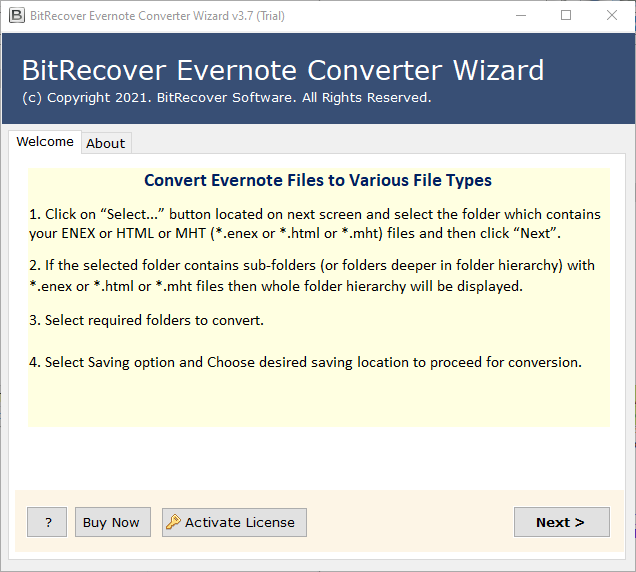
- Secondly, choose from Select Files and Select Folders option to upload your ENEX files and data in bulk.
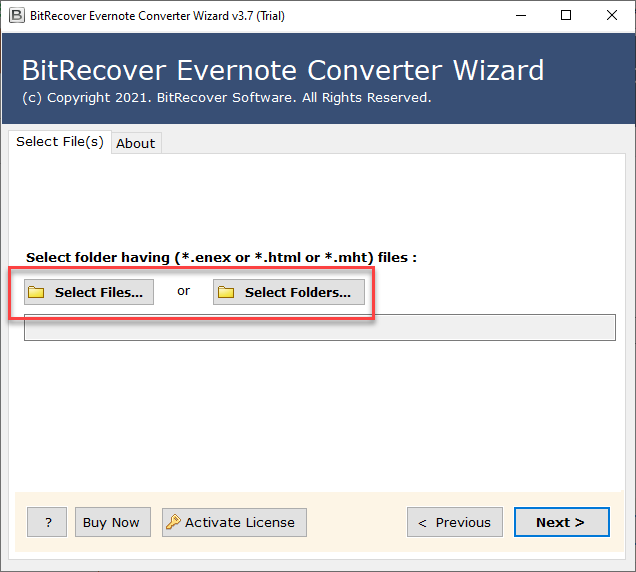
- Thirdly, check all the data that you need to specifically transfer.
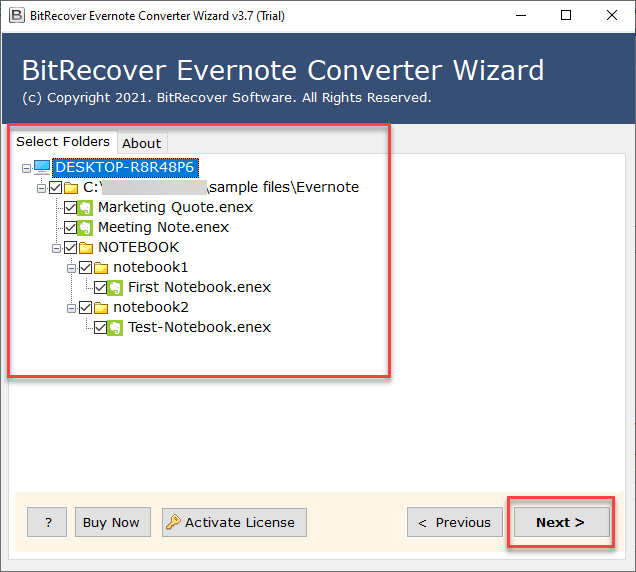
- After this choose PDF format from Select Saving Option list.
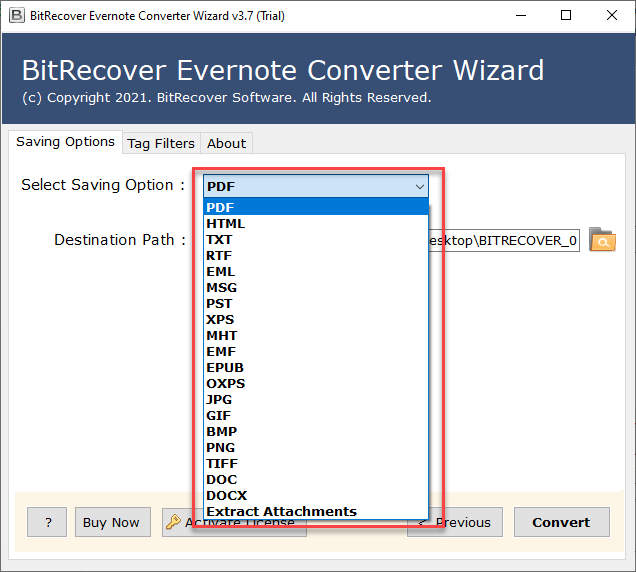
- Choose a desired destination path to save your resultant data. Check create single PDF document if applies.
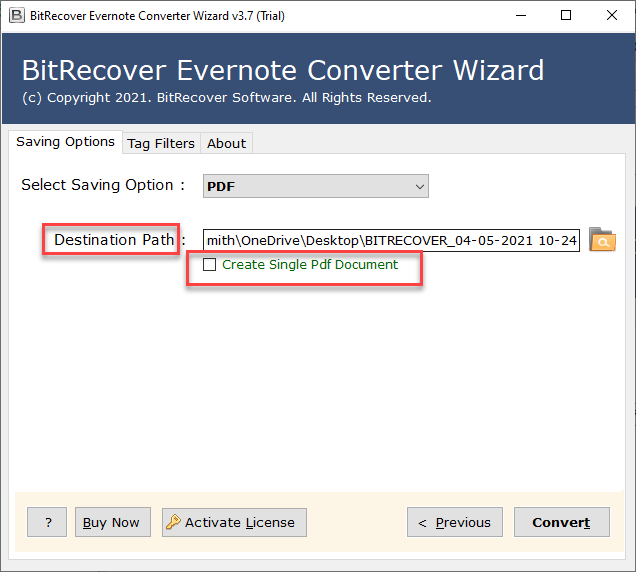
- Lastly, click on the Convert button to finish the entire process.
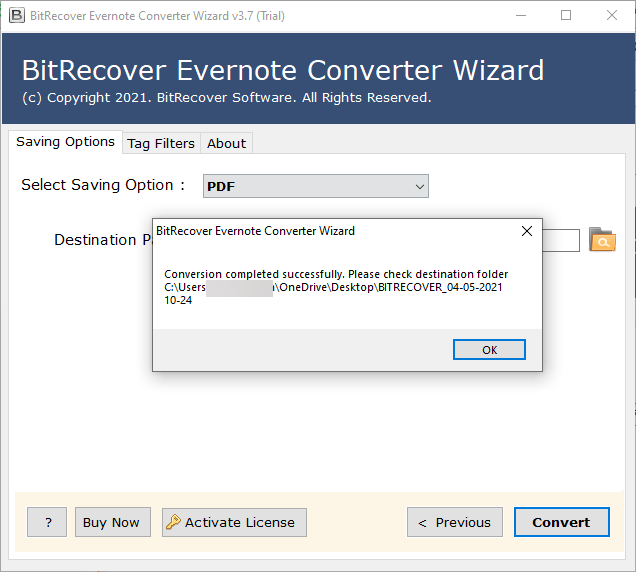
Once the process is completed, you can import all these final data once you have converted EXEX to PDF in to your OneNote notes application in bulk. Also, while working with the trial version you can only convert the first 5 ENEX files with this quick tool.
Notable Features That Makes This Method Standout
- Offers multiple other file formats to store your data according to the compatibility.
- Includes a wide range of special & advanced features to migrate Evernote to OneNote.
- Allows you to choose a desired location to save your final data.
- Standalone solution that import Evernote to OneNote all by itself.
- Keeps entire data intact, safe and secure throughout the entire process.
Conclusion
In conclusion to this blog, we learned the process to migrate Evernote to OneNote efficiently with mainly two processes. We have explained both the processes deeply to understand the correct way to export Evernote to OneNote note taking app. You just need to understand both the processes carefully before starting proceeding with any of them. Therefore, if still you are confused or have a query about this topic or want to know more about the process. You can get in touch with out technical support team any time.