How to Repair Corrupted PDF Files Quickly and Safely?
Do you want to repair corrupted PDF files? Then this blog will be your saviour to save your PDF files from damage and corruption. PDF corruption is a common issue that is faced by many users. The most frequent traits of a corrupted PDF file are that it shows error messages, opens blank pages, or sometimes even fails to open the PDF. This situation can be frustrating when we want the file urgently, and it won’t open.
Users search for reliable ways to open corrupted PDF files using free or manual ways. Some basic methods may work in minor cases, but they often fail with highly damaged files. That is why we are providing you with both the methods, whether manual as well as professional, to repair corrupted PDF files. In this blog, we will explain the basic reasons behind the corruption of PDF files and how to avoid them using the best methods.
Why are PDF Files Corrupted?
There are several reasons behind PDF file corruption:
- When a computer system suddenly shuts down while saving a PDF.
- Due to some viruses and malware attacks on a server leads to file corruption.
- PDF file gets corrupted when downloaded incompletely.
- Using outdated versions or incompatible PDF file readers creates a file corrupted.
Tips to Avoid PDF File Corruption
- Always download the PDF file completely.
- Use an updated version of the PDF reader.
- Eject USB drives and external storage safely.
- Always use a trusted antivirus software on your PC.
Read More: Extract Files From PDF Portfolio
Manual Methods to Repair Corrupted PDF Files
If your PDF file has minor corruption, then you can try these three following methods:
Method 1: Open the corrupted in a different PDF Reader
- Try to open the PDF in Adobe Acrobat Reader.
- If it fails, try alternatives like Google Chrome, Microsoft Edge.
- Save the file again if it opens successfully.
Method 2: Re download the PDF File:
- Delete the corrupted PDF file.
- Then, download it again from the original source.
- Ensure the download before opening.
Method 3: Use Adobe Acrobat built in repair option:
- Open Adobe Acrobat, then click file.
- Now, open and select corrupted PDF.
- Acrobat will repair the file automatically.
Drawbacks of the Manual Methods
Manual methods are free but they have several limitations:
- Fails to repair most of the corrupted PDF files.
- There is no guarantee of complete data recovery.
- Time-consuming process and error prone.
- Due to these limitations users may look for more reliable and accurate solutions to fix broken PDFs.
Professional Method to Repair Corrupted PDF Files
If you are not satisfied with the results of the manual methods, then you may need to choose the professional solution to repair corrupted PDF files. One of the most reliable and safest solution is the Turgs PDF Converter, it is designed to repair and recover corrupted PDF files easily. This tool fixes broken PDFs without altering the original content of the PDF file.
This software can recover corrupted PDF files, including text, images, hyperlinks, and formatting. This tool repairs both types of PDFs whether it has minor damage or major damage. Also it works smoothly for a single PDF file as well as multiple files.
Steps to Repair PDF files professionally
- Firstly, download and install the software on your system.
- Then, add the corrupted PDF file using the dual option.
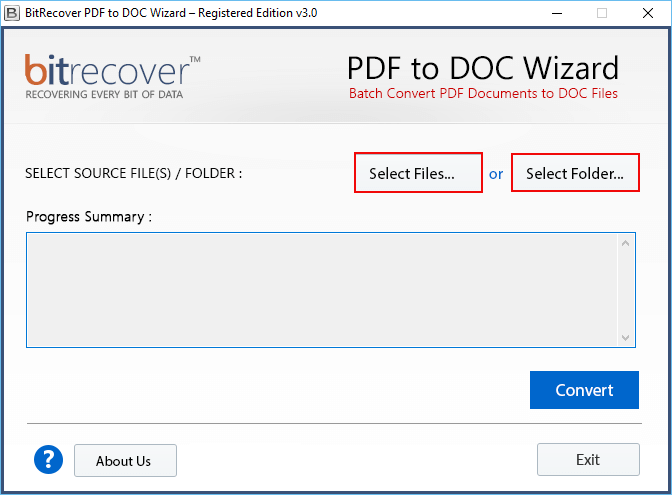
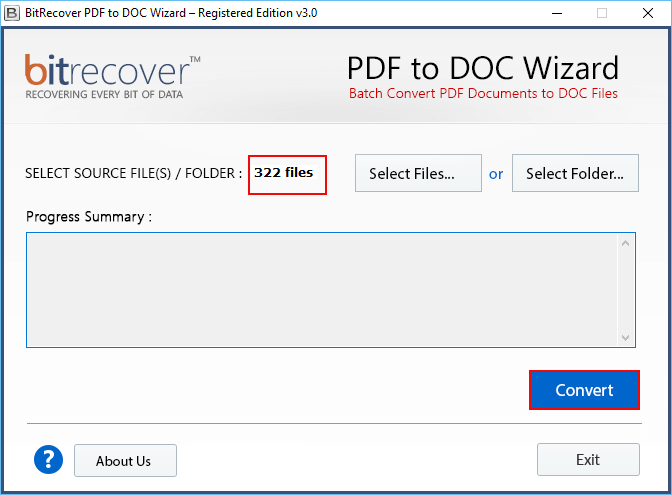
- Now, click Convert to fix the broken PDF.
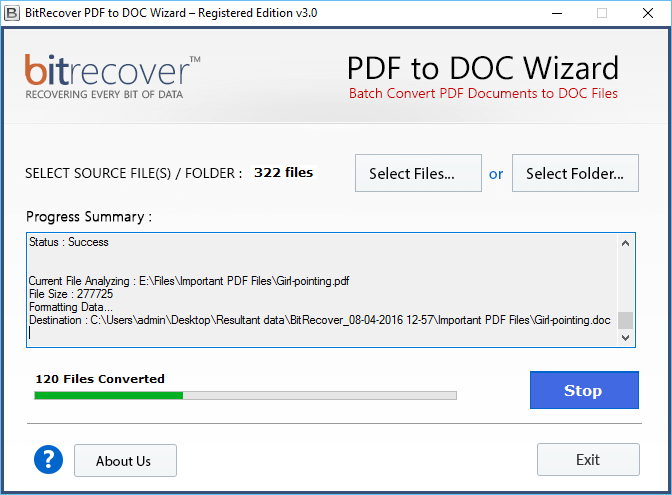
- Finally, files are repairing, please wait.
Key Features of the Tool
- This tool repairs severely damaged or corrupted PDF files.
- It has the ability to repair and recover corrupted PDFs in bulk.
- This solution maintains the original formatting and layout of the PDF.
- Provides you preview option before saving the repaired PDF file.
- This software is compatible with all the major PDF versions.
Conclusion
In conclusion of this blog, we have mentioned the best practices to repair corrupted PDF files. The manual methods may help in minor cases, but they are risky and inaccurate when dealing with important and confidential documents. However, if you want a secure and accurate method to repair corrupted PDF files, then using the professional method is a smart choice. It ensures complete security while recovering the corrupted PDF files. With the help of this tool you can save time and prevent data loss. These advanced features make this tool highly valuable and safer for managing PDF files.