Import Mailbird to Yahoo Mail: Step-by-Step Migration Guide

Importing Mailbird emails to Yahoo Mail requires an MBOX export from Mailbird followed by an IMAP-based import into Yahoo. The Turgs Mailbird Backup Wizard automates the entire process: it reads your Mailbird email store, connects to Yahoo over IMAP and transfers all emails with attachments and folder structure intact.
Mailbird stores your emails locally. Yahoo Mail lives in the cloud.
Moving emails from Mailbird to Yahoo means bridging a local email client with a web-based service. You cannot drag and drop. You need either a manual MBOX export and re-import, or a direct migration tool that connects to both.
This guide covers both methods to import Mailbird to Yahoo Mail, with step-by-step screenshots.
Why Import Mailbird Emails to Yahoo?
The most common reasons for this migration:
- Switching from a desktop email client to webmail for cloud access
- Moving to a new computer where Mailbird is not installed
- Consolidating email accounts into Yahoo Mail
- Closing a business domain and archiving emails to a personal Yahoo account
One limitation to know: Yahoo Mail does not have a native MBOX import feature. Any migration requires either IMAP-based import or an intermediary tool.
Method 1: Manual Export from Mailbird and Import via IMAP
Mailbird exports emails as MBOX files (via the ImportExportTools add-on in the underlying Thunderbird engine, or through a supported plugin).
- In Mailbird, go to Settings then Accounts then Export to get an MBOX file of your emails.
- Import the MBOX into Thunderbird (File then Import then Mail Files).
- Add your Yahoo account to Thunderbird via IMAP.
- Drag emails from the MBOX folder to the Yahoo IMAP folder in Thunderbird.
This works but is slow for large mailboxes and drops folder hierarchy if your Mailbird has nested folders.
Method 2: Direct Migration with Turgs Mailbird Wizard
The Turgs Mailbird Backup Wizard reads your local Mailbird email store directly and transfers emails to Yahoo Mail via IMAP in one run.
Step-by-Step: Import Mailbird to Yahoo Mail
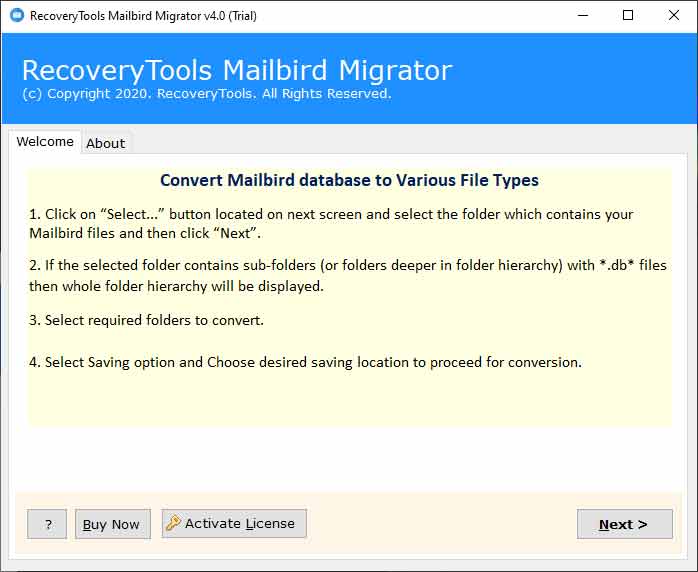
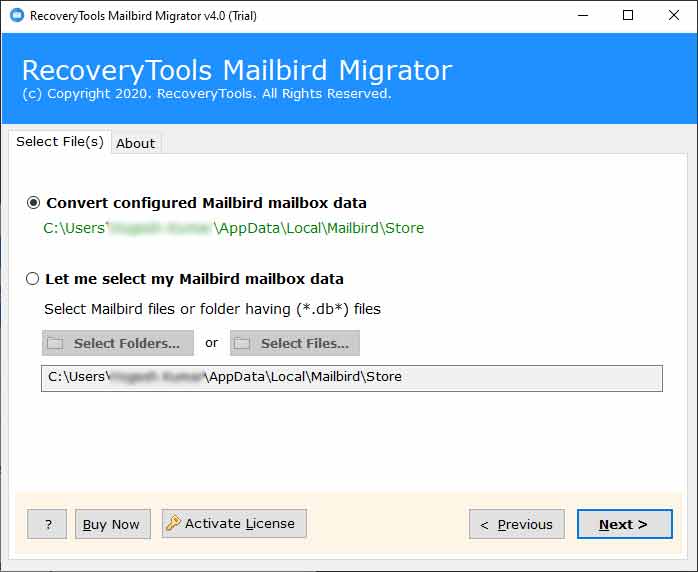
Step 1. Launch the Turgs Mailbird Backup Wizard. Click Select Files or Browse to load your Mailbird data store.
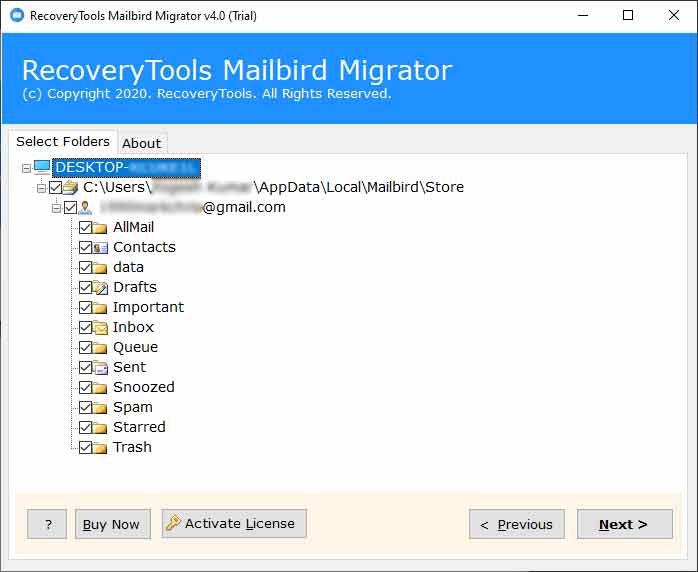
Step 2. The tool loads your Mailbird folders and emails. Select the folders you want to import to Yahoo Mail.
Step 3. From the saving options, select Yahoo Mail as the destination.
Step 4. Select the Yahoo option from the saving list.

Step 5. Enter your Yahoo Mail email address and password (or App Password if 2FA is enabled).

Step 6. Click Backup. The tool begins migrating your Mailbird emails to Yahoo. A live progress bar shows the transfer status.

Yahoo App Password for IMAP Access
If your Yahoo account has two-factor authentication enabled, you need a Yahoo App Password instead of your regular password.
- Go to login.yahoo.com/myaccount/security.
- Under Generate app password, select a device and click Generate password.
- Copy the 16-character app password and use it in the migration tool.
If you later need to move emails from Yahoo to another service, see the guide on exporting Yahoo Mail to Word. And for importing from a different client into another webmail account, the guide on importing MSG files to Thunderbird covers a related workflow.
Are you migrating from Mailbird because you are switching computers, or are you moving to Yahoo as your primary email platform?
Frequently Asked Questions
Does Mailbird have a built-in export to Yahoo feature?
No. Mailbird does not have a native Yahoo export option. You need either the manual MBOX workaround or a dedicated migration tool.
Will attachments transfer to Yahoo Mail?
Yes. The Turgs Mailbird Wizard transfers emails with all attachments intact. Each email arrives in Yahoo Mail with its original attachments embedded.
How long does the Mailbird to Yahoo migration take?
Migration speed depends on the number of emails and your internet connection. A 5,000-email mailbox typically migrates in 20 to 60 minutes. The tool shows a live progress counter.
Will my Mailbird folder structure be preserved in Yahoo?
Yes. The tool replicates your Mailbird folder hierarchy as Yahoo Mail labels or folders. Emails arrive in the same folder structure as in Mailbird.
Can I migrate only specific Mailbird folders?
Yes. In Step 2, you can tick individual folders rather than selecting all. Only the selected folders migrate to Yahoo.
What if the migration fails partway through?
Re-run the migration for the affected folders. Yahoo Mail handles duplicate emails gracefully via IMAP, so re-migrating a folder that partially transferred will not create duplicate messages in most cases.