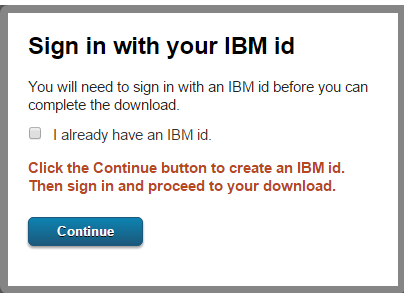
- Firstly, you should have Lotus Notes IBM ID before downloading IBM Notes and Domino Trials. And, for this click on link: https://www.ibm.com/developerworks/downloads/ls/lsndad/ where you will find "Download Trial" button. When you click, it will ask you to enter credentials. If you already have IBM ID, enter it or click on "Continue" button to create a new one.
- In the second step, a page will open with different versions of Lotus Notes IBM client. Just select the required one and click on "Continue" button.
- Now, enter the details related IBM Notes and click on "I Confirm" button.
- In the Next step, select required Download option and click on "Download now" button to start download process.
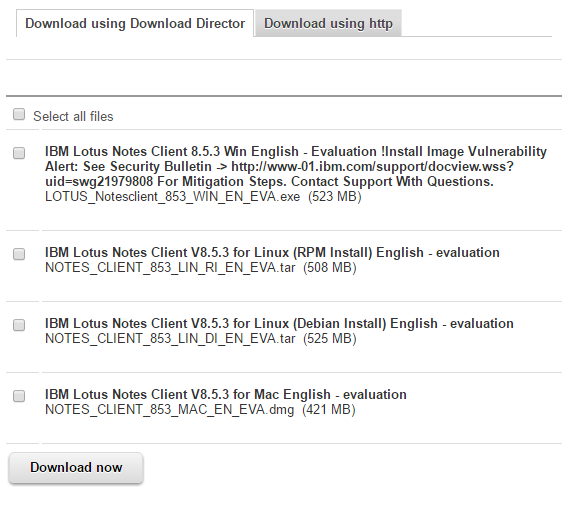
Note: If you are going to perform email conversion related NSF file using Turgs Software then, Lotus Notes should be installed and configured on your system.
Lotus Notes email client does not allow users to import NSF file directly from different versions due to some security issues. That's why when you try to open old .nsf file in Lotus Notes, it throws an error message which is given below:
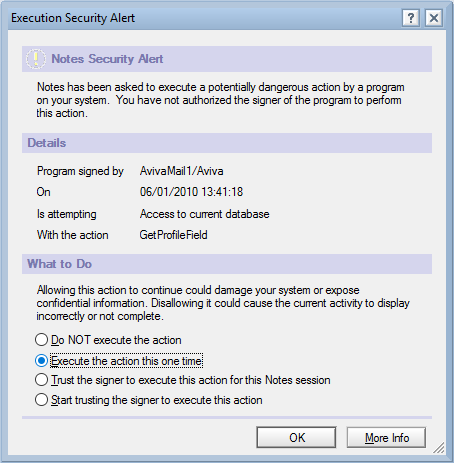
To get rid from this situation, just select the required option from given below options:
- "Execute the action this one time."
- "Trust the signer to execute this action for this Notes session."
- "Start trusting the signer to execute this action."
Sometimes, when you try to open these types of file using Turgs NSF Wizard, you will get some error messages related NSF file. So, first open it with Lotus Notes, set Trust option for NSF, and then use Turgs Software to convert NSF file.


