Turgs Video

USA.com Backup Wizard

(Complete Solution to Backup USA.com Emails in Windows)

  • Complete USA.com email data integrity is well maintained.
  • Export USA.com to any of required file formats.
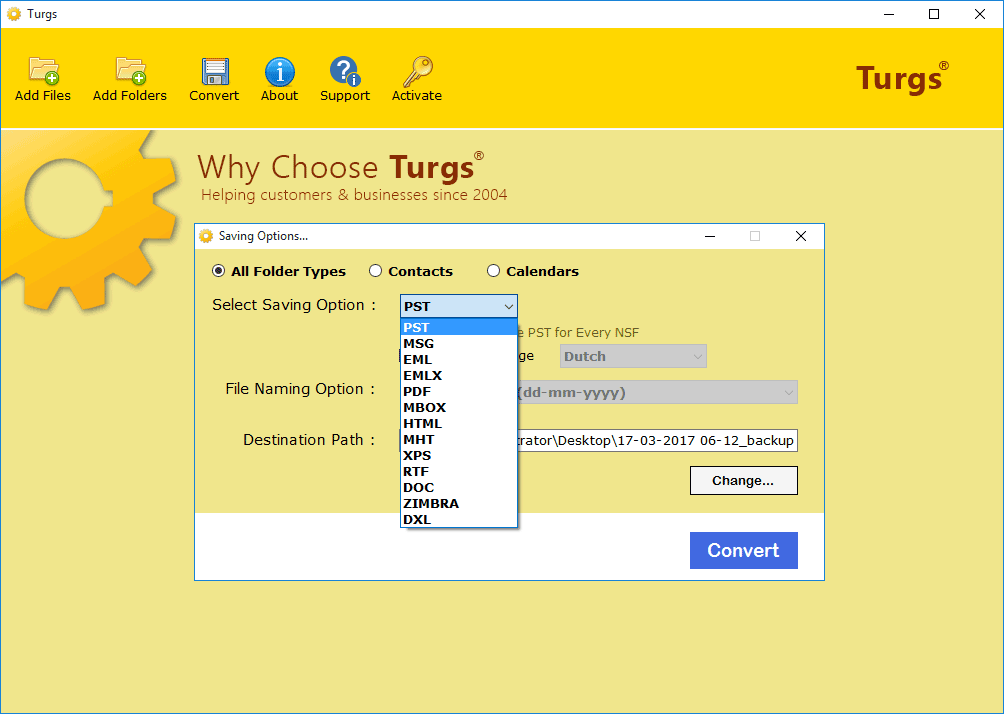
    USA.com Converter software can convert USA.com to PST, USA.com to PDF, USA.com to MSG, USA.com to EML, USA.com to EMLX, USA.com to MBOX, USA.com to HTML, USA.com to MHT, USA.com to XPS, USA.com to RTF, USA.com to DOC, etc.
  • Capable to take USA.com mail into various email formats.
    This tool can export USA.com to Windows Live Mail, USA.com to Yahoo, USA.com to Lotus Notes, USA.com to Office 365, USA.com to Zimbra, USA.com to Thunderbird, USA.com to Gmail, USA.com to Outlook.com, USA.com to G Suite, USA.com to Rediffmail, etc.
  • Performs very fast and safe USA.com mailbox backup.
  • Allow quick USA.com backup with advanced filter options.
  • Migrate USA.com data in bulk with attachments easily.
  • Offers multiple file naming option for ease of data access.
  • Permit to save converted data at desired destination path.
  • Supports all the available versions of Windows OS.

Compatible with all latest Windows OS

Free Download Order Now

**Download and try the free demo version of USA.com mailbox backup Software. This version allows users to convert 25 USA.com email to Outlook, USA.com email to PDF, etc. each available format so that users could aware of the efficiency of this software to migrate USA.com emails.

Noteworthy Features of USA.com Backup Tool

Complete Items

Convert USA.com Mail to Various File Formats

Not one but into many file formats the USA.com Mails data could be migrated using this reliable USA.com Backup software. It mainly supports conversion of USA.com Mails data to all the available saving formats like USA.com to PST, EML, PDF, MBOX, MHT, DOCX, Gmail etc. You just need to provide the account credentials to the software then it will begin backup of USA.com mail at required formats.

Complete Items

Export USA.com Mail to Various Email Formats

Users can create USA.com email backup not just into file formats but also to numbers of required and most commonly used email formats like USA.com to Zimbra, USA.com to Thunderbird, USA.com to Windows Live Mail, USA.com to Lotus Notes, USA.com to Rediffmail, USA.com to Yahoo, USA.com to Office 365, USA.com to Gmail, USA.com to Outlook.com, USA.com to G Suite, etc. effortlessly.

Complete Items

Supports USA.com Email Conversion in Bulk

Users can convert USA.com emails in bulk efficiently using the Turgs USA.com Backup Wizard. Don’t worry about for whatever the numbers of emails you have. It can convert all the emails with attachments in batch in the minimum possible time easily. Only users need to put the account credentials rest software performs.

Complete Items

Backup USA.com without Any Modification

Backup USA.com stress-free of any kind of data loss. It is capable to convert USA.com emails in its exact form without any kind of data loss. This software performs bulk USA.com backup without any data loss in any form. It retains all the Meta properties of USA.com email like text, layout, hyperlinks, etc.

Complete Items

Saves Your Resultant Data at Desired Location

Using USA.com converter tool you can even save your data at the desired location. This software offers software option to choose the required location path to save the converted USA.com email data at the required location so that the required data could be accessed easily at the required time.

Complete Items

Performs Safe and Quick USA.com Backup

USA.com Converter software performs very fast and safe USA.com email data conversions. Only users need to provide software the account credentials. Then this tool will begin the USA.com email data migration in seconds. This software is compatible with all the versions of Windows Operating System.

Avail all the Benefits of USA.com Email Wizard

How to migrate USA.com email data in Windows?

Screenshots - USA.com Email Converter

These screenshots will help you to execute hassle-free USA.com emails conversions in Windows Operating System.

Start the Software

Step 1 : Open the software, put the account details and choose USA.com emails.

Select Required Filters

Step 2 : Choose filters for the selective backup of required USA.com emails.

Data Conversion Ongoing

Step 3 : The Backup of USA.com emails process in progress. Press OK once get completed.

Guide - How to backup USA.com mail with attachments in Windows?

Download, install and open USA.com Backup Software in your system and choose USA.com from email source.

Start the Software

Now choose the required file option among the different available file formats and email formats. Also, choose the desired destination path and file naming option to save the data desirably.

Choose Saving Options

Choose the advanced settings option for the selective backup of the required USA.com email like the subject, date range, sender or receiver, etc. Press “Backup” after selection to proceed further.

Select Required Filters

Soon after selection of the smart saving options software will start the backup of the emails within seconds.

Data conversion ongoing

Now open your email client or chosen destination path to find the converted USA.com emails files.

USA.com converted emails

Buy Now

Personal License

For Personal use:

$99

Business License

For Business purpose:

$299

Bundle Offer

For Personal use:

Email Backup Wizard + GMX Mail Backup Wizard + Backupify Wizard + Office 365 Backup Wizard + Yahoo Backup Wizard + Zoho Mail Backup Wizard

$304 $249

Payment Options

Note: Your Software will get delivered on your registered email id, within 15 minutes after placing the order.

FAQ's About – USA.com Email Converter Software/

To take USA.com backup using this Turgs USA.com Backup Wizard just follow these simple to do steps:

  1. Firstly, users need to download and open USA.com Backup Wizard on the system.
  2. Now provide tool your mail account details and choose the required saving options and press "Backup".
  3. The software will initiate the Backup of USA.com emails in seconds, press OK once the process gets completed. You will find all the converted USA.com email data at the chosen destination path.

No, except with the demo version which permit users to convert only 25 USA.com emails to each available saving format absolutely free, just for the purpose evaluation.

No, this software is enough efficient to take USA.com Backup to Outlook without installation of Outlook. This software only needs USA.com mail data files that need to be converted. Well, if you want to open converted data then you need Outlook.

No, it is completely a Windows OS supporting software.

Client Testimonials